I just realised that I cannot add tags to my API:Gateway-stage using CloudFormation templates. However, it’s possible to tag using the command line. But this requires knowledge of the id of the stage - which you don’t get when you use the !Ref function on the Stage.
Quick post on how to set Alarms in AWS CloudWatch that trigger for certain URLs only. This assumes you use API Gateway.
Bascially, you can set Alarms in 3 ways only: Either on the entire API, on the API and the Stage OR on API, Stage, Resource and Method. For the latter two Enable Detailed CloudWatch Metrics has to be checked in the Logs section of Stage properties.
That’s basically it. You need all four dimensions if you want to filter by URL and you need enable Cloudwatch metrics on the stage.
Here’s a YAML snippet showing the declaration of an alarm.
If you, like me, started to recently get the error “This item cannot be shared. Please select a different item” when sharing to Whatsapp, then this might help you.
You are probably sharing a text-item. In my case it was a text containing an URL.
Instead, I now share the NSURL-object (or an array of objects, in which one is an NSURL object).
I am relatively sure this is a bug in the latest version of Whatsapp, but as long as it persists, this might be a workable workaround.
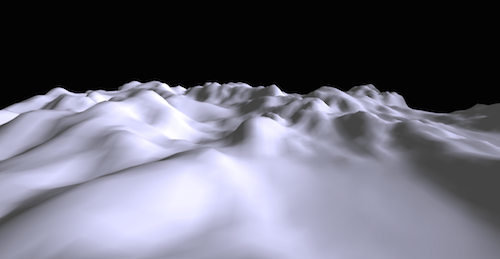
Ok, this isn’t very complicated, even though it looks kind of cool.
The aim is to go from this:
to this:
The idea is that the brighter a pixel on the heightmap is, the higher the elevation of the resulting mesh is. So the first step is to get the values for all the pixels in the PNG. This is accomplished by drawing the image onto a canvas, and then getting the pixel data from it. It looks something like this:
canvas.getContext('2d').drawImage(img, 0, 0, img.width, img.height);
var data = canvas.getContext('2d').getImageData(0,0, img.height, img.width).data;
The next step is to create a planar mesh with ThreeJS and go through all the pixel and set their z-value, their elevation, according to the color of the pixel.
for (var i = 0, l = geometry.vertices.length; i < l; i++)
{
  var terrainValue = terrain[i] / 255;
  geometry.vertices[i].z = geometry.vertices[i].z + terrainValue * 200 ;
}
Please keep in mind that in this case the width in pixels is 1 more than the number of segments in the plane. (If there’s one segment, theres 2 vertices, two segments, 3 vertices, and so forth..) If that’s not the case more work is required, because the landscape will be “skewed” if height and width dont correspond correctly.
I decided to play around with node.js, specifically with node-webkit.
Node-webkit allows programmers to write desktop-apps with Javascript, and even package them for distribution, for example via the Mac App Store. (Check out this list of apps written with it.)
To play with it, I’ve decided to write a tiny thesaurus-app.
It should lookup and display synonyms and related words using a (German) thesaurus via the JSON-API at openthesaurus.de.
To be really useful, it should be possible to bring the app to the foreground using a keyboard shortcut. In my case it’s Shift+Alt+T.
It should be possible to dismiss the app by tapping ESC
It worked quite nicely. The app doesn’t really feel like a web-app, even though it utilizes web-app technologies. And I could even create a binary for the App Store.
# this is about http://en.wikipedia.org/wiki/Monty_Hall_problem
num_rounds = 5000
num_correct_guesses_keep = 0
num_correct_guesses_switch = 0
num_rounds.times do
doors = [false, false, false]
doors[rand(3)] = true# first pick = random
player_pick = rand(3)
show_bad_door = doors.index(true)
# show a bad door that is not the price_door and not player's pickwhile (doors[show_bad_door] || show_bad_door == player_pick)
show_bad_door = rand(3)
end# second pick, player choses to switch to the other door
remaining_doors = [0, 1, 2]
remaining_doors.delete(show_bad_door)
remaining_doors.delete(player_pick)
player_switch_pick = remaining_doors.first
win = if doors[player_pick]
num_correct_guesses_keep += 1"yes"else"no"end
win_switch = if doors[player_switch_pick]
num_correct_guesses_switch += 1"yes"else"no"end
puts "doors: #{doors}, show_bad_door: #{show_bad_door}, "\
"player keeps: #{player_pick}, player wins: #{win}, "\
"player wins if he switches: #{win_switch}"end
win_ratio = ( num_correct_guesses_keep.to_f / num_rounds.to_f * 100.to_f ).round(2)
win_ratio_pick = ( num_correct_guesses_switch.to_f / num_rounds.to_f * 100.to_f ).round(2)
puts "correct: #{num_correct_guesses_keep}, correct-switch: #{num_correct_guesses_switch}, "\
"win-ratio: #{win_ratio}%, win-ratio switch: #{win_ratio_pick}%"
Switching really doubles the probability to win. Dang it. ;)
I’ve just uploaded my new app. It is called “Zones” and it’s one of those desktop helper tools for Mac OS X. You can take a look at Zones here.
It was fun to do and I learned a bunch of stuff about Mac OS X. It was probably also the last side-project ever written in Objective-C for me, since the Apple world is switching to Swift now. (Which is good.)
Sadly, I cannot distribute the app through the AppStore, because it cannot be sandboxed using the APIs it does (Accessibility). Which means I will probably never earn enough money to buy a happy meal with it.
 Lukas Z's Blog